
Updated in November 2026: In 2026, almost every business is using SaaS, from Gmail to ChatGPT to Shopify. In this guide, we will explain SaaS in simple words, with real examples, so even a beginner can understand it fully.
If you have been using the internet for work, study, or business, you have already used SaaS. You just may not have known the name for it.
When you open Gmail to check your email, when you use Google Docs to write a document, when you watch Netflix, or when you design something on Canva, you are using SaaS. You did not download a big CD, you did not install heavy software, and you did not pay thousands of dollars upfront. You just opened your browser, logged in, and started working.
So, what does SaaS stand for? Let’s answer it in the simplest way possible, and then go deeper than most articles do, because if you are a beginner, a student, a freelancer, or a small business owner, you deserve a clear and honest explanation, not confusing technical jargon.
What Does SaaS Stand For?
SaaS stands for Software as a Service.
Let’s break that down word by word, because once you understand these three words, you will never forget it.
Software means the app or program you use. For example, Gmail is software, Zoom is software, Shopify is software.
As a means in the form of.
Service means you are not buying the software forever, you are renting it as a service, just like you rent Netflix or pay for your mobile data package.
In the old days, you bought software once. You went to a shop, bought a CD, installed it on one computer, and if a new version came, you had to buy it again. That was expensive and annoying.
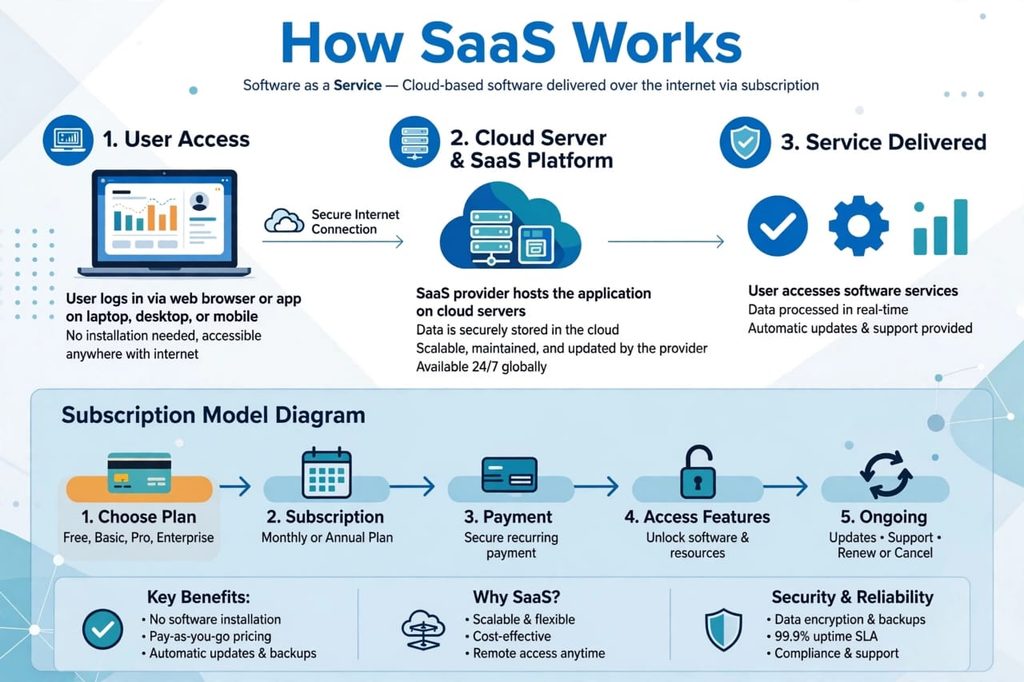
With SaaS, the company keeps the software on their own powerful computers, which we call cloud servers. You simply pay a small monthly or yearly fee, and you can use it from anywhere. That is the whole idea of Software as a Service.
In simple words: SaaS means using software on the internet without installing it, by paying a subscription.
What Is SaaS? A Real-Life Example For Beginners
Imagine you want to drink clean water. You have two options.
Option 1: You buy your own water plant, install it in your house, hire people to maintain it, and fix it yourself when it breaks. This is expensive and stressful.
Option 2: You just turn on the tap, clean water comes, and you pay a small monthly bill. You do not worry about the plant, the pipes, or the maintenance. The company handles everything.
SaaS is Option 2.
You do not own the software. You just use it. The SaaS company handles the servers, security, updates, backups, and technical problems. You just log in and do your work.
This is why almost every modern business in 2026 uses SaaS. It is simpler, cheaper to start, and much more flexible.
How Does SaaS Work? Step By Step
Many beginners ask, “How does SaaS work behind the scenes?” The process is actually very simple, and you use it every day without noticing.
Step 1: You Sign Up
You go to a website like canva.com, slack.com, or zoom.us. You create a free account or choose a paid plan. It takes less than 2 minutes.
Step 2: The Software Lives In The Cloud
You do not download anything big. The app is already running on the company’s cloud servers, which are large, secure computers in data centers around the world.
Step 3: You Access It Through The Internet
You open your browser or mobile app, log in with your email and password, and the software opens instantly. Whether you are in Pakistan, the US, the UK, or anywhere else, it works the same.
Step 4: You Pay A Subscription
Most SaaS tools work on a SaaS pricing model. You pay monthly or yearly. For example, $9 per month for Basic, $19 for Pro, and $49 for Business. You can cancel anytime. No long-term lock-in in most cases.
Step 5: The Company Handles Everything
Updates? Automatic. Backup? Automatic. Security? Handled by the company. If your laptop breaks, your data is still safe in the cloud because it was never stored only on your laptop.
That is why people say SaaS is convenient. You focus on your work, the company focuses on the technology.
SaaS Meaning In Simple Urdu/Hindi For Our Readers
Many of our readers at SaaS Mega News ask in simple language, “SaaS ka matlab kya hai?”
SaaS ka matlab hai Software ko Service ke tor par istemal karna.
Matlab aap software khareedte nahi, kiraye par lete hain. Jese aap Netflix ka monthly package lete hain, wese hi aap SaaS tools ka monthly package lete hain. Install karne ki zaroorat nahi, bas browser kholo, login karo, aur kaam shuru.
This is the reason SaaS has become so popular for small businesses, freelancers, and students who do not have a big budget for expensive software.
SaaS vs PaaS vs IaaS: What Is The Difference?
This is one of the most searched questions on Google, and also one of the most confusing. Let me make it super easy for you.
Think of it like Pizza.
IaaS – Infrastructure as a Service: The company gives you the kitchen, oven, and ingredients. You have to cook the pizza yourself. Examples: Amazon AWS, Microsoft Azure, Google Cloud. This is for developers and big tech teams.
PaaS – Platform as a Service: The company gives you the kitchen and ready dough. You just add your toppings and bake. You focus on building your app, they handle the servers. Examples: Heroku, Google App Engine.
SaaS – Software as a Service: The company gives you a fully cooked pizza, ready to eat. You just sit and eat. You do not cook anything. Examples: Gmail, Zoom, Canva, Shopify, Slack.
For 99% of normal users and small business owners, SaaS is what you need. You do not need to be a developer. You just need to use the tool.
If you remember only one line, remember this: IaaS is for building, PaaS is for developing, SaaS is for using.
10 Real Examples Of SaaS You Already Use
You might be surprised how many SaaS products you use daily.
- Gmail and Google Workspace: For email, docs, sheets, and drive.
- Zoom and Google Meet: For video meetings and online classes.
- Canva: For design, social media posts, and presentations.
- Shopify: For creating an online store without coding.
- Slack: For team chat and business communication.
- Netflix and Spotify: For entertainment as a service.
- Dropbox and Google Drive: For cloud storage.
- HubSpot and Salesforce: For CRM and customer management.
- QuickBooks and Xero: For accounting and invoicing.
- WordPress.com and Wix: For building websites easily.
If you have used even two of these, you are already a SaaS user. You just did not know the technical term before today.
Types Of SaaS: Which One Do You Need?
Not all SaaS tools are the same. There are different types for different needs.
1. Communication SaaS: For chatting, video calls, and emails. Examples: Slack, Zoom, Gmail.
2. Productivity SaaS: For documents, project management, and notes. Examples: Google Docs, Notion, Trello, Asana.
3. E-commerce SaaS: For selling online. Examples: Shopify, WooCommerce, BigCommerce.
4. Marketing SaaS: For SEO, email marketing, and social media. Examples: Mailchimp, Semrush, HubSpot.
5. CRM SaaS: For managing customers. Examples: Salesforce, Zoho CRM, HubSpot CRM.
6. Accounting SaaS: For money and invoices. Examples: QuickBooks, FreshBooks, Xero.
7. AI SaaS Tools: The new trend in 2026. Tools that use Artificial Intelligence to write, design, code, and automate. Examples: ChatGPT, Jasper, Midjourney.
When you are starting a small business, you do not need 20 tools. You need just 3 to 4 good ones: one for communication, one for design, one for accounting, and one for marketing. That is enough.
SaaS Pricing Models Explained
One question every beginner asks is, “How much does SaaS cost?” The honest answer is: It depends, but it is usually much cheaper than buying traditional software.
Here are the most common SaaS pricing models:
1. Free Plan / Freemium: You use basic features for free. If you like it, you upgrade. Example: Canva Free, Trello Free. This is best for beginners.
2. Monthly Subscription: You pay every month, like $10 or $15. You can cancel anytime. Best for freelancers and testing new tools.
3. Yearly Subscription: You pay for a full year at once, and you get 2 months free in many cases. Best if you are sure you will use the tool long-term.
4. Per User Pricing: You pay for each team member. Example: $12 per user per month. Good for small teams.
5. Usage-Based Pricing: You pay based on how much you use. Example: You pay for 1,000 emails sent, or 10GB storage.
My honest advice for beginners: Always start with the free plan. Test it for 7 to 14 days. If it really helps your work, then upgrade to the paid plan. Never buy a yearly plan on day one.
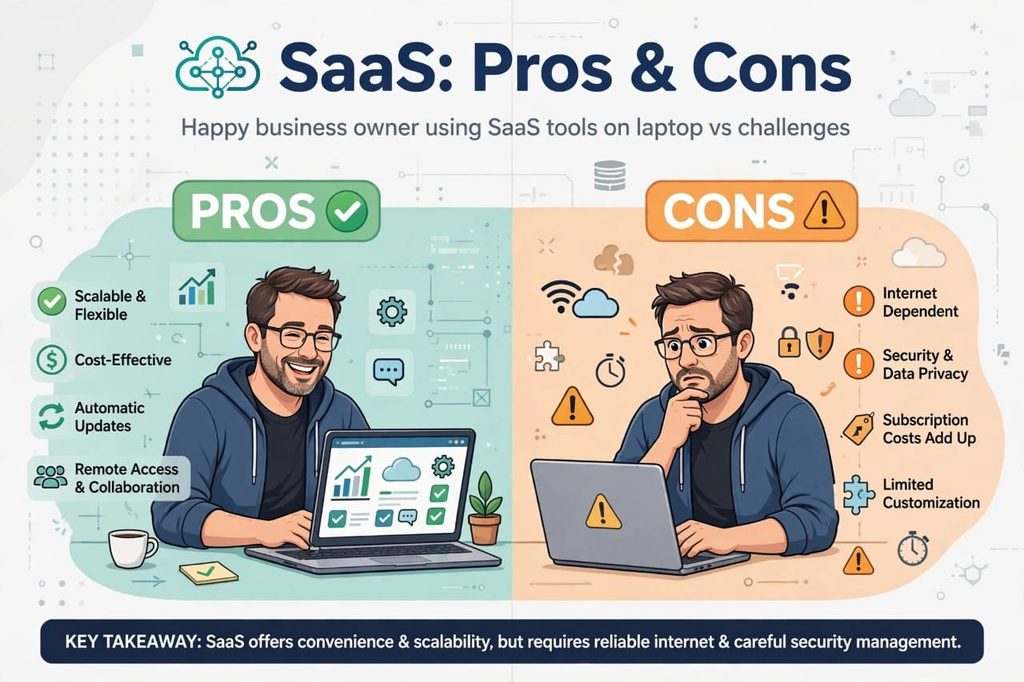
Pros Of SaaS: Why Everyone Loves It
Let’s talk honestly. SaaS is popular for very good reasons.
1. No Installation Needed: You just need a browser and internet. No CD, no heavy download, no technical setup.
2. Very Low Starting Cost: Instead of paying $500 once, you pay $10 per month. This is perfect for small businesses and students in Pakistan, India, and other countries where budget is tight.
3. Work From Anywhere: You can start work on your laptop in the office, continue on your mobile in the car, and finish on your tablet at home. Your data follows you.
4. Automatic Updates: You always get the newest version. You never need to worry about “Update Available” pop-ups or buying a new version.
5. Easy Collaboration: Your whole team can work on the same document, same project, at the same time, from different cities. This is why remote work became possible.
6. Scalable: If you are alone today, you pay for 1 user. If your team grows to 10 people next month, you just upgrade. If it shrinks, you downgrade. No waste.
7. High Security: Big SaaS companies spend millions on security, backups, and data protection. For a small business, that level of security is impossible to build alone.
For these reasons, SaaS is not just a trend. It is the future of software.
Cons Of SaaS: The Honest Truth Nobody Tells You
Now, I want to be 100% honest with you, because a good article should tell both positive and negative sides. SaaS is great, but it is not perfect.
1. You Need Internet: This is the biggest disadvantage. If your internet goes down, you cannot access your SaaS tools. For people in areas with slow internet, this can be a real problem.
2. Monthly Costs Add Up: $10 here, $15 there, $20 there. If you use 10 tools, you are paying $150 per month. That is $1,800 per year. If you do not track it, SaaS can become expensive.
3. Less Control Over Data: Your data is stored on someone else’s server. If that company shuts down, gets hacked, or changes its policy, your data could be at risk. That is why you should always keep your own backup.
4. Limited Customization: With traditional software, you could change everything. With SaaS, you can only use what the company allows. If you need a very special feature, you may not get it.
5. Vendor Lock-In: Once all your data is inside one SaaS tool, it is hard to move to another tool. Companies know this, and sometimes they increase prices because they know you will not leave easily.
6. Privacy Concerns: For sensitive businesses like hospitals or banks, storing data on a third-party cloud can be a concern. You must check their privacy policy and security standards.
My personal opinion? The pros are much bigger than the cons for 90% of people. But you should know the cons before you depend fully on SaaS.
Is SaaS Safe? Should You Trust It?
This is a very common fear. “If my data is on the internet, is it safe?”
The honest answer: SaaS is generally very safe, often safer than keeping data on your own laptop. Why?
Big SaaS companies like Google, Microsoft, and Salesforce use data encryption, two-factor authentication, daily backups, and 24/7 security teams. If your laptop gets stolen, your SaaS data is still safe because you can change your password and log in from another device.
But you also have a responsibility. Always use a strong password, turn on two-factor authentication, and do not share your login with strangers. And for very important files, keep an extra offline backup on a hard drive.
If you do these 3 things, SaaS is safe for you.
How To Start A SaaS Business? A Quick Guide For Dreamers
Many readers ask us, “How can I start my own SaaS business?” This is a big topic, but let me give you a simple roadmap.
Step 1: Find A Problem: Do not start with technology. Start with a problem. What do small businesses struggle with? What do students need? Find one painful problem.
Step 2: Build A Simple Solution: Build the smallest version that solves that problem. Do not try to build the next Facebook on day one. Build one feature that works perfectly.
Step 3: Launch With Free Users: Give it free to 50-100 people. Get feedback. Fix bugs. Improve it.
Step 4: Add Pricing: Once people love it, add a simple pricing plan. Start with $9 or $19 per month.
Step 5: Grow Slowly: Focus on keeping your first 100 customers happy. They will bring the next 1,000 customers through word of mouth.
Starting a SaaS business is hard, but it is one of the best business models in 2026 because you earn recurring monthly income, not just one-time sales.
Best SaaS Tools For Small Business In 2026
If you are a small business owner and you are confused, here is my personal recommendation list for 2026:
For Communication: Slack or Google Workspace
For Design: Canva Pro
For Website: Shopify or WordPress
For Accounting: QuickBooks or Wave (Free)
For Marketing: Mailchimp or HubSpot Free CRM
For Project Management: Trello or Notion
For AI Help: ChatGPT Plus
You do not need to buy all of them today. Start with 2-3. As your business grows, add more.
SaaS In The Future: What Will Happen In 2027 And Beyond?
SaaS is not stopping. In fact, it is growing faster than ever.
In the next few years, we will see:
- AI SaaS Tools will do more work automatically. They will write emails, create designs, and even handle customer support.
- Vertical SaaS will grow. That means SaaS tools made only for one industry, like SaaS for doctors, SaaS for schools, SaaS for restaurants.
- No-Code SaaS will allow anyone to build an app without coding.
- Cheaper SaaS for developing countries like Pakistan, India, Bangladesh, and Nigeria.
If you learn SaaS now, you are learning a skill that will be useful for the next 10 years.
Frequently Asked Questions (FAQs)
What does SaaS stand for?
SaaS stands for Software as a Service. It means you use software over the internet by paying a subscription, instead of buying and installing it.
What is an example of SaaS?
Gmail, Zoom, Canva, Shopify, Netflix, and Slack are all examples of SaaS.
Is SaaS a cloud service?
Yes, SaaS is a type of cloud computing. The software runs on cloud servers and you access it through the internet.
What is the difference between SaaS and traditional software?
Traditional software you buy once and install on one computer. SaaS you rent monthly and use from any device via the internet.
Is SaaS good for small business?
Yes, SaaS is perfect for small business because it is cheap to start, easy to use, scalable, and requires no technical team.
What is SaaS full form?
The full form of SaaS is Software as a Service.
Final Thoughts: Should You Use SaaS?
If you have read till here, you now know more about SaaS than 90% of people.
To summarize: SaaS stands for Software as a Service. It is software you use on the internet without installing it. It is cheaper, easier, and more flexible than old software. It has some disadvantages like internet dependency and monthly costs, but for most beginners, students, freelancers, and small business owners, the benefits are much bigger.
My advice is simple: Start with one free SaaS tool today. Try Canva, Notion, or Trello. Use it for a week. You will feel the difference yourself.
And if you want to learn more about SaaS tools, SaaS business ideas, and AI SaaS tools in 2026, keep reading SaaS Mega News. We publish simple, honest, and beginner-friendly guides every week.
What is your favorite SaaS tool? Tell us in the comments below. We would love to hear from you.
Also Read: Top SaaS Companies in 2026 – Best SaaS Tools
[…] What does SaaS stand for? […]
[…] is why in 2026, choosing the right project management software is not a luxury anymore. It is survival. The right tool will save you 5 to 10 hours every single […]