
Updated for 2026-27: If You Are Still Managing Your Team on WhatsApp, Please Read This
If you are still managing your small team on WhatsApp, Gmail, and Excel in 2026-27, you are losing 5 to 10 hours every single week. I am not saying this to scare you. I have seen this with my own eyes.
I have worked with small businesses, startups, agencies, and remote teams. And the problem is almost always the same. It is not that your team is lazy. It is not that you don’t work hard. The real problem is that your work is scattered everywhere.
One task is in WhatsApp. One file is in Gmail. One deadline is in someone’s head. And one client is waiting for an update that nobody remembers to send. Does this sound familiar? If yes, you are not alone. Almost every small team faces this mess in the beginning.
That is why in 2026-27, choosing the right project management software is not a luxury anymore. It is survival. The right tool will save you 5 to 10 hours every week. The wrong tool will waste your money and frustrate your team even more.
In this guide, I have tested, compared, and reviewed the 10 best project management software for small teams in 2026-27. I will tell you honestly what is good, what is bad, who should use it, and who should avoid it. No sponsored hype, just real talk.
Let’s get into it.
Quick Answer: Which Tool Should You Pick in 2026-27?
If you don’t have time to read the full guide, here is my honest short answer:
Best Overall: ClickUp – Free to start, all-in-one, best for teams of 2 to 15 people.
Best for Simplicity: Trello – You can learn it in 10 minutes, even if you are not technical.
Best for Growing Teams: Asana – Best when you need timelines, reporting, and structure.
Best for Low Budget: Basecamp – Flat price, no per-user tension.
My personal pick for most small teams in 2026-27 is ClickUp. Why? Because it replaces 4 tools in one. You don’t need a separate tool for tasks, docs, chat, and goals.
Why Small Teams Need Project Management Software in 2026-27
Let me ask you a simple question. How many times did you ask your team this week, “Where is that file?” or “What is the status of that task?”
If you asked it more than 3 times, you need a system. Not a new employee. A system.
Here is what happens when a small team has no proper tool in 2026-27:
- Work gets duplicated because two people do the same task.
- Deadlines get missed because nobody knows who is responsible.
- Clients get angry because they don’t get updates on time.
- You as the owner get tired because you have to remember everything.
A good project management tool fixes all 4 problems. It gives you one place where every task, file, deadline, and comment lives. You open one dashboard in the morning and you know exactly what your whole team is doing.
In 2026-27, clients also expect this. They don’t want updates on WhatsApp. They want a professional link where they can see progress. If you don’t have that, you look unprofessional, even if your work is very good.
Comparison Table: Top 10 Tools at a Glance in 2026-27
Tool | Best For | Free Plan | Paid Starts At | My Rating
ClickUp | All-in-one | Yes | $7/user/month | 4.8/5
Asana | Growing Teams | Yes | $13.49/user/month | 4.7/5
Trello | Simplicity | Yes | $5/user/month | 4.6/5
Monday.com | Visual Work | Yes | $9/user/month | 4.6/5
Notion | Docs + Tasks | Yes | $10/user/month | 4.7/5
Basecamp | Flat Price | No | $15/user/month flat | 4.5/5
Teamwork | Agencies & Clients | Yes | $10.99/user/month | 4.5/5
Wrike | Advanced Reporting | Yes | $10/user/month | 4.4/5
Smartsheet | Excel Lovers | Yes | $9/user/month | 4.4/5
Airtable | Custom Workflows | Yes | $20/user/month | 4.5/5
Save this table. It will help you decide in 2 minutes.
1. ClickUp – Best Overall for Small Teams in 2026-27
ClickUp is my number 1 pick for 2026-27, and there is a strong reason for it.
When you are a small team, you don’t want to pay for 4 different tools. You want one tool that does everything. ClickUp does that. You get tasks, docs, whiteboards, goals, chat, and time tracking in one place.
I have seen a team of 7 people run their whole agency on the free plan of ClickUp for 4 months. They did not need to pay anything.
What I Liked:
- Free plan is actually powerful, not a fake free plan. You get unlimited tasks.
- You can see your work in List, Board, Calendar, Timeline, and Gantt view.
- It has 1000+ integrations with Slack, Google Drive, Zoom, and Gmail.
- It is very good for both beginners and advanced users in 2026-27.
What I Did Not Like:
- In the first week, it feels a little heavy. There are too many options. A new user can get confused.
- The mobile app is sometimes a little slow.
Who Should Use It?
Startups, agencies, and small teams of 2 to 15 people who want everything in one place.
Who Should Avoid It?
If your team hates technology and wants something super simple, start with Trello instead.
Price: Free plan available. Paid starts at $7 per user per month.
2. Asana – Best for Teams That Need Structure in 2026-27
Asana is the cleanest tool on this list. If your team keeps missing deadlines, Asana will fix it.
Its Timeline view is beautiful. You open it in the morning and you can see in one screen who is doing what, what is late, and what is next. No confusion.
I recommend Asana when your team grows from 5 to 15 people and you need proper reporting for your boss or clients in 2026-27.
What I Liked:
- Very clean and professional interface. No clutter.
- Timeline and My Tasks view is the best in the market.
- Reporting is excellent. You can show your client a beautiful progress report in 1 click.
- It is trusted by big companies, so your clients will take you seriously.
What I Did Not Like:
- Paid plan is a little expensive at $13.49 per user.
- Free plan is good but limited to 15 people.
Who Should Use It?
Growing teams of 10 to 20 people who need structure and reporting.
Who Should Avoid It?
If your budget is zero, Asana paid plan will feel expensive. Start with ClickUp free.
Price: Free plan available. Paid starts at $13.49 per user per month.
3. Trello – Best for Beginners and Non-Technical Teams in 2026-27
If your team hates complex software, please start with Trello. Don’t force them to use a hard tool. They will stop using it after one week.
Trello is just simple boards, lists, and cards. You drag a card from “To Do” to “Doing” to “Done”. That’s it. A new member learns it in 10 minutes. I have taught Trello to a 55-year-old shop owner, and he learned it in one call.
What I Liked:
- Easiest tool on this list. Zero learning curve.
- Very fast mobile app. You can update a task from your phone in 5 seconds.
- Free plan is enough for most small teams in 2026-27.
What I Did Not Like:
- Not good for big projects. When you have 100+ tasks, boards become messy.
- Reporting is very basic. You don’t get proper timelines.
Who Should Use It?
Small teams of 2 to 7 people, freelancers, and teams who want simplicity.
Who Should Avoid It?
If you need advanced reporting, timelines, and time tracking, Trello is not for you.
Price: Free plan available. Paid starts at $5 per user per month.
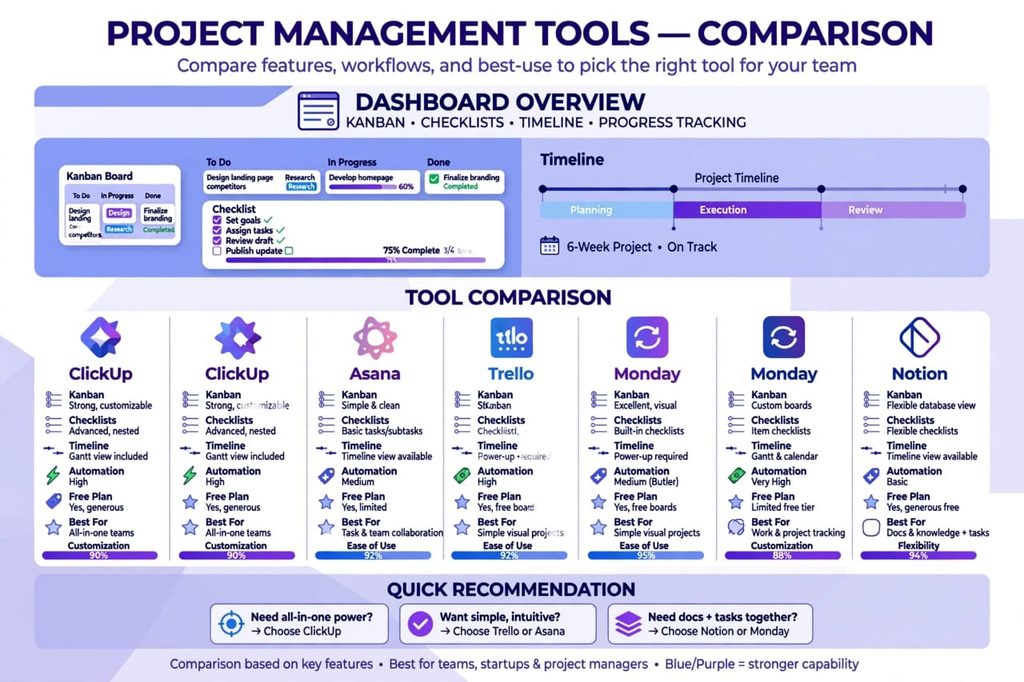
4. Monday.com – Best Visual Project Management Tool in 2026-27
Monday.com is for teams who love colors, visual boards, and dashboards. If you are a marketing team, creative team, or sales team, you will love it.
You can track your marketing campaign, sales pipeline, and client work all in one colorful dashboard. Your clients will be impressed when you share it.
What I Liked:
- Most beautiful and visual interface.
- Great for marketing and creative teams.
- Automation saves a lot of time in 2026-27. For example, when a task is done, it auto-moves to next stage.
What I Did Not Like:
- Price goes up quickly when your team grows.
- Sometimes it feels more like a CRM than a simple task tool.
Who Should Use It?
Marketing teams, creative agencies, and visual learners.
Price: Free plan available. Paid starts at $9 per user per month.
5. Notion – Best for Docs + Tasks Together in 2026-27
Notion is different from all other tools. It is not just a task tool. It is a Wiki, Docs, Notes, and Tasks in one page.
If your team writes a lot of SOPs, meeting notes, and company docs, Notion is unbeatable in 2026-27. You can make a company handbook and your task board in the same place.
I use Notion myself for writing and planning. It is my favorite for content teams.
What I Liked:
- Best for documentation. You can write SOPs and tasks together.
- Very flexible. You can build it exactly how you want.
- Beautiful templates for every type of business.
What I Did Not Like:
- It is not a pure project management tool. You have to set it up yourself.
- For beginners, setup can take 2-3 days.
Who Should Use It?
Content teams, startups, and teams who write a lot of docs.
Price: Free plan available. Paid starts at $10 per user per month.
6. Basecamp – Best Flat Price Tool in 2026-27
Basecamp is famous for one thing: Flat price. It charges $15 per user flat, no per-user headache.
Most tools charge you per user. So if you have 20 people, you pay $200+. Basecamp does not do that. This is why many agencies with 15-30 people love Basecamp in 2026-27.
What I Liked:
- Flat pricing saves a lot of money for bigger small teams.
- Very simple. No extra features to confuse you.
- Includes message boards, to-do lists, and file storage.
What I Did Not Like:
- No free plan.
- It does not have advanced features like Gantt charts or automation.
Who Should Use It?
Teams of 15+ people who want to save money and want simplicity.
Price: $15 per user per month flat. No free plan.
7. Teamwork – Best for Agencies and Client Work in 2026-27
If you bill clients by hours, Teamwork is made for you. It is the only tool on this list that has proper time tracking + invoicing built-in.
You can track how many hours your team spent on a client project, and then send an invoice from the same tool. No need for a separate invoicing tool.
What I Liked:
- Time tracking and invoicing is built-in. Big time saver for agencies.
- Client view is very professional.
- Good for agencies who manage 10+ clients at once.
What I Did Not Like:
- Interface is a little old compared to Monday or ClickUp.
- Learning curve is medium.
Who Should Use It?
Agencies, freelancers, and teams who bill clients by hours.
Price: Free plan available. Paid starts at $10.99 per user per month.
8. Wrike – Best for Advanced Reporting in 2026-27
Wrike is for teams who need approval workflows and detailed reports. If your boss asks you every Monday, “Give me a full report,” Wrike will make your life easy.
It has approval flows, workload view, and custom dashboards. It is a little advanced, but very powerful in 2026-27.
What I Liked:
- Best reporting and approval workflows.
- Good for teams who work with big clients.
What I Did Not Like:
- Too advanced for a team of 3-4 people.
- Free plan is very limited.
Who Should Use It?
Teams of 15-30 people who need reporting and approvals.
Price: Free plan available. Paid starts at $10 per user per month.
9. Smartsheet – Best if You Love Excel in 2026-27
If your team lives in Excel and Google Sheets, Smartsheet will feel like home. It looks like Excel, but it has automation, alerts, and project views.
Many old-school managers love Smartsheet because they don’t have to learn a new style. It is Excel with superpowers.
What I Liked:
- Familiar Excel-like view. No learning needed for Excel users.
- Automation is good. You can set alerts when a task is late.
What I Did Not Like:
- Interface looks old.
- Not as visual as Monday or ClickUp.
Who Should Use It?
Finance teams, operations teams, and Excel lovers.
Price: Free plan available. Paid starts at $9 per user per month.
10. Airtable – Best for Custom Workflows in 2026-27
Airtable is like Excel + Database + Project Tool in one. If you need custom fields, custom views, and custom workflows, Airtable is unbeatable in 2026-27.
You can build a CRM, a hiring tracker, a content calendar, and a project tracker all in Airtable.
What I Liked:
- Most flexible tool on this list.
- You can build anything you want.
- Great templates.
What I Did Not Like:
- Price is high at $20 per user.
- For simple task management, it is overkill.
Who Should Use It?
Teams who need custom workflows and databases.
Price: Free plan available. Paid starts at $20 per user per month.

How to Choose the Right Tool in 2026-27? (Simple Formula)
Don’t choose by looking at features. Choose by your team size and your work style. Use this simple formula for 2026-27:
If your team is 2 to 5 people: Choose Trello or Notion. Keep it simple.
If your team is 5 to 15 people: Choose ClickUp or Asana. You need structure now.
If you work with clients: Choose Teamwork or Basecamp.
If your budget is zero: Start with ClickUp Free or Trello Free. Don’t pay in the first month.
If you love Excel: Choose Smartsheet.
My biggest advice: Don’t buy a paid plan on day 1. Use the free plan for 14 days with your real team. If your team actually uses it daily, then pay. If they don’t use it, the tool is wrong, not your team.
Common Mistakes Small Teams Make in 2026-27
- Choosing the most expensive tool thinking expensive means best. It doesn’t. The best tool is the one your team will actually use.
- Buying a tool but not training the team. Spend 30 minutes on a video call and teach them how to use it.
- Using 3 tools at once. This creates more mess. Pick ONE tool and stick to it for 90 days.
- Not setting one owner for each task. Every task must have one name and one deadline. If a task has no owner, it will never get done.
Final Verdict: My Honest Recommendation for 2026-27
After testing all 10 tools, my final verdict is clear for 2026-27.
For most small teams in 2026-27, ClickUp is the best choice. It is free to start, it grows with you, and you don’t need 3 other tools. You can start today and your whole team can be on it by tomorrow.
If your team is very non-technical and hates complex tools, start with Trello. You will not regret it.
If your team is growing fast and you need reporting for clients, go with Asana.
Don’t overthink it. Pick one today, use it for 30 days, and your team will save 5 to 10 hours every week. That is the real return on investment in 2026-27.
FAQs – Best Project Management Software for Small Teams in 2026-27
What is the best free project management software for small teams in 2026-27?
ClickUp and Trello have the best free plans in 2026-27. ClickUp is best if you want all features for free. Trello is best if you want simplicity.
How much does project management software cost for small teams in 2026-27?
Most tools cost $5 to $13 per user per month in 2026-27. Basecamp charges a flat price which is better for bigger small teams.
Which project management tool is easiest for non-technical teams in 2026-27?
Trello is the easiest, followed by Basecamp. Both can be learned in less than 15 minutes.
Which tool is best for remote teams in 2026-27?
Asana and ClickUp are best for remote teams in 2026-27 because they have timeline view, comments, and async updates. You don’t need to be online at the same time.
Is Asana better than ClickUp in 2026-27?
Asana is better for clean reporting and structure. ClickUp is better for all-in-one features and free plan. For most small teams, ClickUp wins on value in 2026-27.
Can I use project management software for free in 2026-27?
Yes. ClickUp, Trello, Asana, Monday.com, and Notion all have free plans in 2026-27 that are enough for teams of up to 10 people.
[…] need an AI Governance Framework. Not a big boring document. But a simple, clear system to control AI transformation before AI starts controlling the […]