
If you have ever used Gmail, Netflix, Zoom, or Canva, you have already used SaaS. You just probably didn’t call it that.
Most of us don’t think about the technical term. We just open the browser, log in, and get our work done. But behind that simple login, there is a whole business model that has completely changed how software is made, sold, and used. That model is called SaaS. So, What is SaaS in simple words? Let’s understand it step by step.
In this guide, I am going to explain SaaS in very simple words, like I would explain it to a friend who is not technical at all. No boring definitions. No complicated jargon. Just real examples, honest pros and cons, and what it actually means for you in 2026, whether you are a business owner, a student, a freelancer, or someone thinking about starting your own software business.
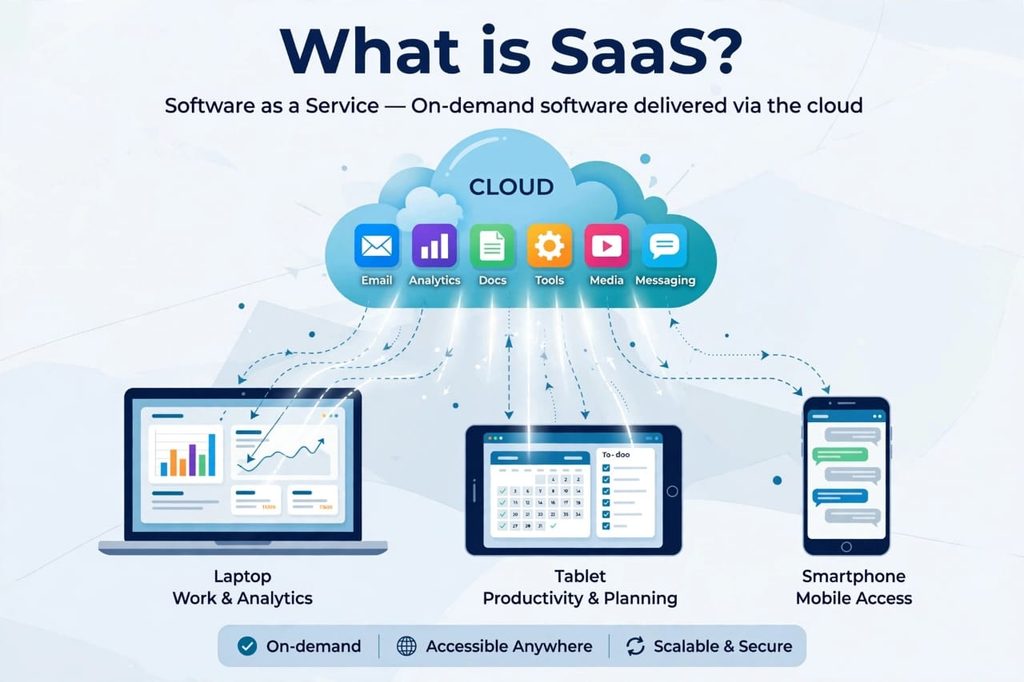
What is SaaS? The Simple Meaning
SaaS stands for Software as a Service.
In the old days, if you wanted software, you had to go to a shop, buy a CD, install it on your computer, and hope your computer was powerful enough to run it. If the software had a bug, you had to wait for a new version. If your computer crashed, your data was gone.
SaaS changed all of that.
With SaaS, you don’t buy the software. You rent it. You pay a monthly or yearly fee, and you use it directly from the internet, usually in your browser or an app. The company that made the software takes care of everything else — the servers, the updates, the security, the backups.
Think of it like this: Old software was like buying a car. SaaS is like using a taxi app. You don’t need to own the car, maintain it, or worry about repairs. You just pay when you use it, and you get to your destination.
A simple example is Google Docs. You don’t install Google Docs on your computer. You just go to docs.google.com, log in, and start writing. Your file is automatically saved in the cloud. You can open the same file from your phone, your laptop, or a friend’s computer. That is SaaS in its purest form.
How Does SaaS Actually Work?
This is where many beginners get confused, so let me make it very easy. Now that you know What is SaaS, let’s look at its real advantages and disadvantages.
When you use a SaaS product, three things are happening in the background:
1. The Software Lives in the Cloud
The company hosts the software on its own powerful servers. You don’t need a powerful computer. Even a cheap laptop or a phone can run a heavy tool like Figma or Salesforce, because the heavy work is done on their servers, not yours.
2. You Access It Through the Internet
You just need a browser and an internet connection. No installation, no CD, no license key to lose. You sign up, you log in, and you are inside.
3. You Pay a Subscription
Instead of paying $500 one time, you pay $10, $20, or $50 per month. If you don’t like it, you can cancel next month. If your team grows, you just add more users. If your team shrinks, you remove them.
That is why businesses love it. It is flexible. You are not locked in for years.
Let me give you a real-life example. A small shop owner in Pakistan or India might use QuickBooks for accounting, WhatsApp Business for customer chat, and Canva for making posters. He is not buying any software. He is paying small monthly fees for all three, and he can manage his whole shop from his phone. Ten years ago, this would have been impossible without spending thousands of dollars.
Real Examples of SaaS You Already Use Every Day
You might be surprised how much SaaS is already part of your daily life.
For Communication and Work
Gmail, Outlook, Zoom, Slack, Microsoft Teams, Google Meet. All of these are SaaS. You don’t install a Gmail server at home. You just log in.
For Entertainment
Netflix, Spotify, YouTube Premium. You don’t download movies to your computer anymore. You stream them. That is also a form of SaaS, even though people usually call it streaming.
For Business and Productivity
Salesforce for customer management, HubSpot for marketing, Shopify for online stores, Notion for notes and projects, Trello for task management, Canva for design. These are the tools that power thousands of small businesses today.
For Developers and Creators
GitHub, Figma, Adobe Creative Cloud, WordPress.com. Even if you are a developer, you are probably using SaaS tools to build other software.
The point is, SaaS is not some future technology. It is already everywhere. If you are reading this article on your phone, you are likely using at least five SaaS apps without even realizing it.
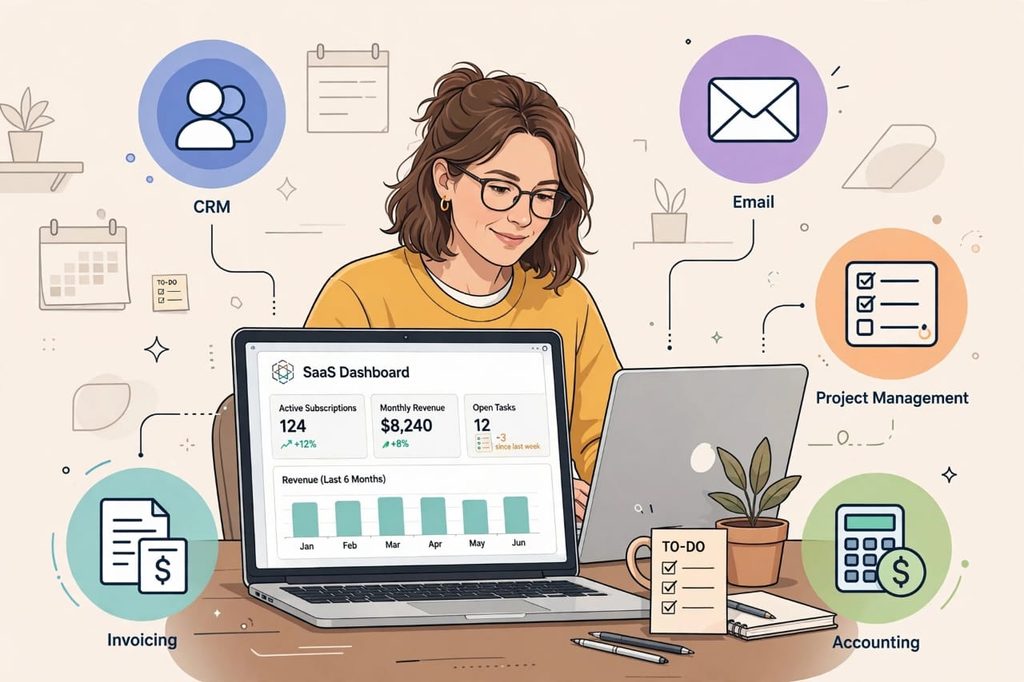
SaaS vs Traditional Software: What is the Real Difference?
I have used both, and honestly, the difference is huge. Let me show you in a simple comparison.
In traditional software, you pay once, you install it, and you own that version. If a new version comes out, you pay again. If you change your computer, you have to install it again. If you lose your data, it’s your problem.
In SaaS, you pay monthly, you never install anything, you always get the latest version automatically, and your data is saved in the cloud. If you change your laptop, you just log in again and everything is there.
But there is a catch, and I will be honest about it. With traditional software, you own it. With SaaS, you are renting it. If you stop paying, you lose access. That is the biggest trade-off, and it’s something many people don’t think about until they have to cancel a subscription.
Still, for most people and most businesses in 2026, the convenience of SaaS wins over the old way.
The Advantages of SaaS: Why Everyone is Moving to It
Let’s talk about the good side first, because there is a lot to like.
1. Low Starting Cost
You don’t need to spend thousands of dollars upfront. You can start with a free trial or a $10 plan. This is a game-changer for startups and students. I remember when starting a business meant buying expensive software. Now a student can start a business from a hostel room with just a laptop and a few SaaS subscriptions.
2. Access From Anywhere
Your office is wherever you are. You can start a document on your laptop at home, continue it on your phone in a taxi, and finish it on your office computer. As long as you have internet, your work follows you.
3. Automatic Updates
You never have to worry about updating. The company updates the software in the background. One day you log in and you see a new feature. You didn’t have to do anything. This also means you are always protected from old security bugs.
4. Easy to Scale
If you are a freelancer today and you hire 5 people tomorrow, you just add 5 users. If your business grows to 50 people, you upgrade your plan. You don’t need to buy new servers or hire an IT team. The SaaS company handles the scaling for you.
5. Better Collaboration
This is my personal favorite. Multiple people can work on the same file at the same time. You can see who changed what. You can leave comments. No more sending files back and forth on email with names like final-v2-final-FINAL.docx. Anyone who has worked in a team knows how painful that was.
The Disadvantages of SaaS: The Honest Truth Nobody Tells You
Now let’s be honest. SaaS is not perfect. Every blog will tell you the advantages, but few will tell you the problems. I have faced some of these myself, so I want you to know them before you depend fully on SaaS.
1. You Need Internet All the Time
This is the biggest problem. If your internet is slow or goes down, you cannot work. In many parts of the world, internet is still not stable. If you are traveling or in a village with weak signals, SaaS tools become useless. Traditional software at least works offline.
2. Monthly Costs Add Up
$10 here, $20 there, $50 for another tool. At first it feels cheap. But after a year, you realize you are paying $200-$300 every month for 10 different tools. Over 3-4 years, you might have paid more than if you had just bought the software once. This is called subscription fatigue, and it is very real.
3. You Don’t Own Your Data Fully
Your data is on someone else’s server. If the company shuts down, increases its price a lot, or changes its rules, you are stuck. You have to trust them to keep your data safe and private. Most big companies are trustworthy, but small startups can disappear overnight. I have seen tools I loved shut down with just one month’s notice.
4. Less Control and Customization
With SaaS, you get what the company gives you. You cannot change the software deeply the way you could with traditional software. If you need a very specific feature, you have to wait for the company to add it, or you have to find another tool. You are dependent on their roadmap, not yours.
5. Privacy and Security Concerns
Even though big SaaS companies have strong security, no system is 100% safe. Your business data, customer emails, and financial records are stored online. If there is a data breach, your information could be exposed. This is why you should always check a SaaS company’s privacy policy before putting sensitive data in it.
So, is SaaS bad? No. But is it perfect? Also no. Like everything in life, it has both good and bad sides. The smart approach is to use it wisely, not blindly.
SaaS Pricing Models Explained in Simple Words
If you have ever looked at a SaaS pricing page, you have seen Free, Pro, and Enterprise plans. It can be confusing. Let me break it down.
Freemium Model
You can use the basic version for free forever, but you pay for advanced features. Canva and Dropbox use this model. It is great for trying a tool before you commit.
Flat-Rate Subscription
You pay one fixed price every month, no matter how much you use it. Simple and predictable.
Per-User Pricing
You pay for each person on your team. For example, $15 per user per month. If you have 10 users, you pay $150. This is the most common model for business tools like Slack and HubSpot.
Usage-Based Pricing
You pay based on how much you use. For example, you pay for each email sent, each gigabyte stored, or each AI request. This is becoming very popular in 2026, especially for AI tools.
My advice: Always start with the free trial. Don’t buy the yearly plan on day one. Use it for 14 days, see if your team actually uses it, then decide.
Who Should Use SaaS?
Honestly, almost everyone can benefit, but it is especially useful for:
Small Business Owners: You get enterprise-level tools without hiring an IT team.
Freelancers and Creators: You can manage clients, invoices, design, and marketing from one laptop.
Startups: You can launch fast, test ideas quickly, and scale without heavy investment.
Students: Many SaaS tools offer free student plans. You can learn tools that companies actually use.
Large Companies: They use SaaS to connect teams across different countries and save on infrastructure costs.
If you are someone who works alone and doesn’t need collaboration, traditional software might still be fine for you. But if you work with a team, or you work from different devices, SaaS is almost always the better choice in 2026.
How to Choose the Right SaaS Tool Without Wasting Money
This is where most people make mistakes. They sign up for 10 tools, use 2, and keep paying for 8. Here is a simple method I follow.
First, write down the exact problem you want to solve. Don’t start with the tool, start with the problem. For example, “I need to manage my customers” is a problem. “I need HubSpot” is a tool.
Second, list 3 tools that solve that problem, and try their free trials one by one. Don’t try all at once, you will get confused.
Third, check three things: Is it easy to use? Does it integrate with the tools you already use? Can you export your data easily if you want to leave?
Fourth, check the pricing after 6 months. Many tools look cheap at first, but become expensive when you add more users.
And finally, read real reviews, not just the testimonials on their website. Look for what people complain about. If 20 people complain about bad customer support, believe them.
The Future of SaaS in 2026 and Beyond
SaaS is not slowing down. In fact, it is changing again with AI.
In 2026, we are seeing a new wave called AI-Native SaaS. These are tools that were built with AI from day one, not just added AI as a feature. For example, AI customer support tools that can reply to customers automatically, or AI project management tools that can predict delays before they happen.
We are also seeing more vertical SaaS, which means tools made for one specific industry, like SaaS for dentists, SaaS for restaurants, or SaaS for schools. Instead of one generic tool for everyone, companies are making specialized tools for specific jobs.
Another trend is that SaaS tools are becoming more connected. You don’t need to copy data from one tool to another manually. They talk to each other through integrations and automation.
But one thing will not change: The core idea of SaaS will stay the same. Pay for what you use, access it from anywhere, and let someone else handle the technical headaches.
Final Thoughts: Is SaaS Worth It?
If you ask me, yes, SaaS is worth it for most people in 2026, but with one condition: Use it intentionally.
Don’t subscribe to every shiny new tool. Choose 3-4 core tools that you actually use every day, and master them. Cancel the ones you don’t use. Always keep a backup of your important data. And never put all your business on one single tool without a backup plan.
SaaS has made powerful software accessible to everyone. A small business in Khanewal now has access to the same tools as a big company in New York. That was unthinkable 20 years ago. That is the real power of SaaS. So, What is SaaS worth it in 2026? Yes, if you use it smartly.
It is not perfect, it has costs, it has risks, but it has also opened doors for millions of people. And if you understand how it works, its pros and cons, you can use it to your advantage instead of letting it control your budget.
If you are just starting, pick one SaaS tool you already use, like Google Docs or Canva, and notice how it works. You are already living in the SaaS world. Now you understand it.
Frequently Asked Questions About SaaS
Is SaaS the same as cloud computing?
Not exactly. Cloud computing is the technology behind SaaS. SaaS is one way to use cloud computing. Think of cloud computing as electricity, and SaaS as the fan that uses that electricity.
Do I need to install SaaS?
No, in most cases you don’t need to install anything. You just open your browser and log in. Some SaaS tools also have mobile apps, but the main version runs in the browser.
Is SaaS safe?
Generally, yes, if you use reputable companies. Big SaaS companies invest millions in security. But you should still use strong passwords, turn on two-factor authentication, and avoid sharing sensitive data on unknown tools.
Can I use SaaS offline?
Most SaaS tools need internet. Some, like Google Docs, have limited offline mode. But if you need to work fully offline for long hours, traditional software might be better for you.
What is the difference between SaaS, PaaS, and IaaS?
SaaS is ready-to-use software like Gmail. PaaS is a platform for developers to build apps, like Heroku. IaaS is renting servers and storage, like Amazon Web Services. SaaS is for end-users, PaaS and IaaS are more for developers.
[…] accuracy levels, how it was tested, and what risks you have identified. For more details, check our guide on AI Governance: Why AI Transformation Is a Problem of […]