
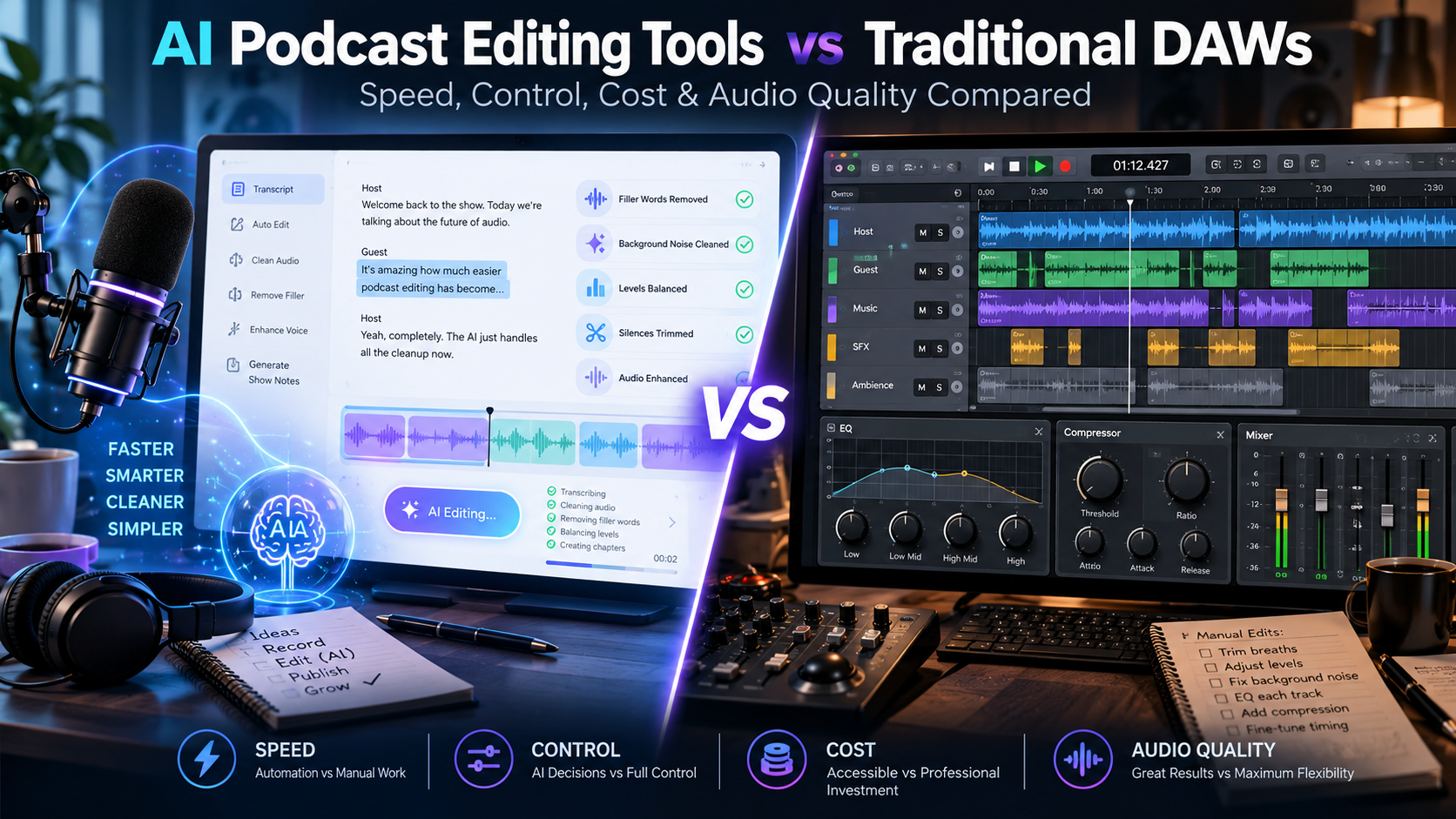
Editorial note: This article is written from scratch and uses official product documentation plus community experience as research inputs. Community reports are treated as anecdotal, not universal facts. Any timing or quality benchmark should be replaced with your own measured test data before publishing if you want to claim first-hand results.
If you are looking for AI podcast editing tools, this guide is for you.
In this detailed comparison of AI podcast editing tools vs traditional DAWs, we tested Descript, Audition and Audacity to help you choose the best workflow in 2026.
AI-Powered Podcast Editing Tools vs Traditional DAWs: Which Workflow Makes Sense in 2026?
If you are looking for AI podcast editing tools, this guide will help you choose the best workflow in 2026. We compared AI podcast editing tools vs traditional DAWs to find which option makes sense for beginners and pros.
Podcast editing used to mean staring at waveforms, zooming into tiny cuts, moving clips on a timeline and listening back again and again. That workflow still works — and for detailed audio production it remains extremely powerful. But AI-powered podcast editors have changed the entry point. Instead of treating spoken audio only as a waveform, many newer tools turn speech into a transcript and let creators edit the recording by editing text.
That sounds like a small interface change, but in practice it changes where time is spent. Repetitive cleanup such as finding filler words, shortening long pauses or making a fast structural cut can become much quicker. The trade-off is that automation does not understand every conversational nuance, overlap, breath, music cue or sound-design decision the way an experienced editor can.
So the useful question is not “Is AI better than a DAW?” A better question is: which parts of podcast editing should be automated, which parts still benefit from manual control, and when does a hybrid workflow give you the best balance?
Google’s own people-first content guidance encourages original information, substantial coverage, clear sourcing and first-hand expertise. Google Search Central explains these quality principles here.
What Is an AI-Powered Podcast Editor? Why AI podcast editing tools Matter
An AI-powered podcast editor is usually built around automation rather than a traditional studio-first workflow. The most recognizable feature is transcript-based editing: the software transcribes the recording, links the words to the underlying media and lets you cut or rearrange spoken content from the text layer.
Adobe describes traditional voice editing as waveform-and-timeline work, while its Podcast Studio uses a transcript so creators can cut, copy and paste spoken material more like a document. Descript uses the same general idea: edit the transcript and the underlying audio or video changes with it.
Depending on the product, AI-assisted features may include filler-word detection, silence shortening, speech enhancement, noise cleanup, automatic captions, clip suggestions, show notes and speaker identification. These can remove a lot of repetitive work, but they still require judgment. A filler word can be meaningless in one sentence and part of the speaker’s natural rhythm in another.
Source: Adobe Podcast — Beginner’s guide to text-based editing
Source: Descript — Edit like a doc
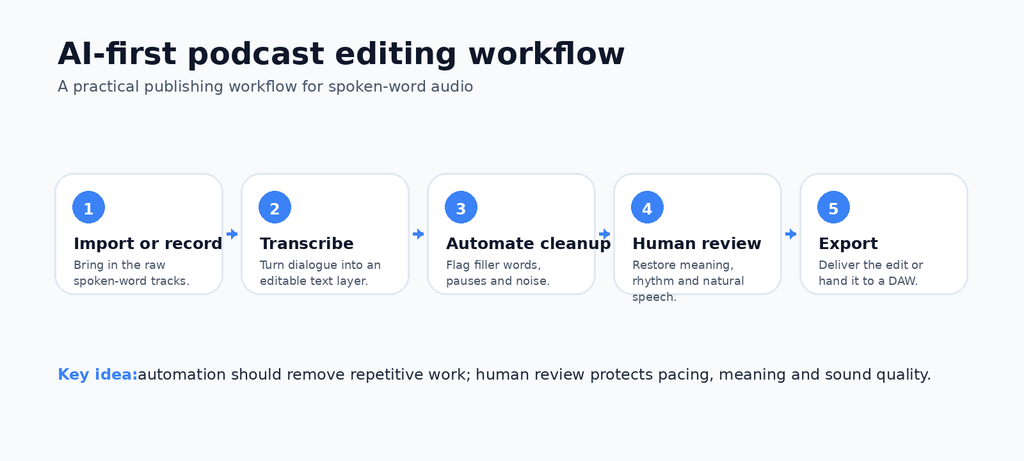
Figure 1. A practical AI-first editing workflow. Human review remains the quality-control layer.
What Is a Traditional DAW?
A digital audio workstation, or DAW, is designed for detailed recording, editing, processing, mixing and mastering. Tools such as REAPER, Logic Pro, Adobe Audition and Audacity expose the audio as tracks, clips and waveforms. You work directly with timing, gain, fades, EQ, dynamics, routing, plug-ins and automation.
That deeper control is the reason DAWs remain important. REAPER, for example, supports multitrack recording, flexible routing, extensive automation and third-party plug-ins. Audacity’s manual documentation shows the classic spoken-word workflow clearly: select audio, trim it, split it, move it or delete it while reading the waveform.
The downside is that fine control creates more decisions. For a simple interview podcast, spending time manually finding every “um” or long pause may be unnecessary. For a narrative show with music, layered ambience, overlapping dialogue and exact timing, those same manual controls can be essential.
Source: REAPER — official feature overview
Source: Audacity Manual — basic audio editing
AI Podcast Editor vs Traditional DAW: Quick Comparison
| Factor | AI-powered editor | Traditional DAW |
| Starting point | Transcript, automation and content structure | Tracks, clips, waveforms and signal flow |
| Speed for rough cuts | Often fast for speech-heavy edits | Usually more manual |
| Filler-word cleanup | Can detect/flag in bulk | Usually found and edited manually or via add-ons |
| Precision | Good for structural edits; varies by task | Very high for timing, overlaps and repair |
| Mixing & sound design | Usually simplified | Deep routing, effects and automation |
| Learning curve | Often beginner-friendly | Higher, especially for advanced mixing |
| Offline control | Depends on product and plan | Common with desktop DAWs |
| Best fit | Fast spoken-word production | Complex or highly controlled productions |
| Strong hybrid use | Rough cut and cleanup | Final polish, mix and master |
1. Speed: Where AI Editing Usually Saves the Most Time
The clearest advantage of transcript-based editing is navigation. When the spoken words are visible, you can search the conversation instead of scrubbing through a long waveform. Deleting a sentence from the transcript can remove the linked media immediately. Bulk filler-word and silence tools can also turn dozens of repetitive micro-edits into a review task.
Descript’s official material highlights transcript editing and automated filler-word removal as core workflow features. Adobe Podcast similarly positions text-based editing as a way to review and change spoken content without endlessly searching a waveform.
Community experience supports the idea that these tools can save time, but the amount varies widely. In r/podcasting discussions, some creators say transcript editing dramatically speeds their rough cut, while others still move the project into Audition, REAPER, Logic or another DAW for the final pass. That is useful evidence of a workflow pattern, not a controlled performance benchmark.
Source: Descript — podcast editor
Source: Reddit r/podcasting — creator experiences with Descript
2. Audio Quality: Automation Is Not the Same as Judgment
AI cleanup can make a noisy or uneven recording easier to listen to, but “one click” should not be confused with “always correct.” Spoken audio contains breaths, hesitation, room tone, crosstalk and emotional timing. Aggressive cleanup can make a conversation feel unnaturally tight or create awkward joins if the tool removes too much.
This is especially important with filler words. Descript’s own 2026 editorial guidance notes that removing every hesitation can make speech sound clipped or synthetic; some fillers carry natural rhythm or thinking time. That is a useful reminder that successful editing is not simply about deleting as much as possible.
Auphonic takes a different role in the workflow. Its documentation focuses on automatic post-production such as loudness normalization, leveling, noise reduction and filtering. That can be useful after an edit, but even automated mastering benefits from listening to the result before publishing.
Source: Descript — which filler words to keep
Source: Auphonic — official documentation
3. Control: Why DAWs Still Matter
If your podcast is mostly two people talking, an AI-first editor may cover the majority of the job. The picture changes when a show becomes more like audio production: several speakers, music beds, sound effects, room-tone repair, complicated crossfades, precise fades, bus processing or heavy restoration.
If you are new to podcasting, check our guide on Best AI Tools for Content Creators in 2026.
A full DAW lets you work at a much smaller level. You can adjust the exact boundary of a cut, automate gain under a sentence, route multiple tracks through shared processing, sidechain music, use specialized plug-ins and make repeated micro-adjustments without giving up control to an automatic decision.
This is also where waveform visibility matters. A transcript tells you what was said. A waveform and timeline show when a sound happened, how long it lasted, how loud it was and how it overlaps with everything else.
4. Cost and Learning Curve: The Cheapest Tool Is the One You Can Use Well
Cost is more complicated than comparing subscription prices. A creator should also count editing hours, hardware needs, learning time and the cost of fixing mistakes. A free or inexpensive DAW can be extremely capable, but it may take longer to learn. An AI subscription can be easier to start with, but cloud limits, AI credits or premium features can become part of the monthly production cost.
For beginners, transcript editing can feel familiar because it resembles editing a document. A DAW asks you to learn audio concepts such as gain staging, EQ, compression, fades, buses, routing and loudness. Those skills take longer to build, but they are transferable and give the editor more control over difficult recordings.
5. Where AI Podcast Editing Can Go Wrong
- Transcription errors on names, jargon, accents or overlapping speakers can create bad text-driven cuts.
- Bulk filler-word removal can make speech sound unnatural if every hesitation is treated as a mistake.
- Noise enhancement may change the tone of a voice or reveal artifacts that need manual checking.
- Automatic cuts may remove a breath or pause that carries meaning.
- Overlapping dialogue, mouth clicks and tiny timing repairs often still need waveform-level editing.
- Cloud-first workflows may be inconvenient when a project needs offline access or very large media files.
Recent r/podcasting threads show both sides of the experience: some creators describe transcript editing as a major time-saver, while others report transcription hiccups, glitches, or the need to finish in a DAW. Those comments are anecdotal, but they help identify the exact failure points worth testing in your own workflow.
Source: Reddit — Descript workflow discussion
Source: Reddit — software/editing discussion, June 2026
6. Where AI Editors Are Genuinely Useful
- Finding and removing obvious false starts quickly.
- Reviewing long interviews from a searchable transcript.
- Shortening repeated long pauses across a recording.
- Flagging filler words for review instead of hunting manually.
- Creating captions, transcripts, clip candidates and show-note drafts from the same source media.
- Giving non-engineers a faster path from raw conversation to a workable rough cut.
7. Where Traditional DAWs Are Still Stronger
- Fine repair of clicks, breaths, overlaps and exact edit boundaries.
- Layered music and sound-design work.
- Advanced EQ, compression, automation and routing.
- Large multitrack sessions that need precise control.
- Offline workflows and local project management.
- Professional finishing where every sonic decision matters.
The Hybrid Workflow: AI for the Rough Cut, DAW for the Finish
For many speech-heavy podcasts, the most practical answer is not choosing one side. Use AI to remove the repetitive work, then use a DAW where detailed control actually adds value.
A hybrid process can start with transcription and a structural pass: remove false starts, obvious tangents, duplicate answers and long dead space. Next, listen through the result and restore anything the automation made too tight. Then move the cleaned project into a DAW for overlaps, clicks, music, detailed fades, EQ, compression and the final loudness pass.
This pattern also appears in creator discussions. Several podcasters describe using text-based tools for an initial “paper cut” or dialogue pass before moving to Audition, REAPER, Logic, GarageBand or another editor for finishing. The important point is not the brand combination; it is the division of labor between fast content editing and precise audio finishing.
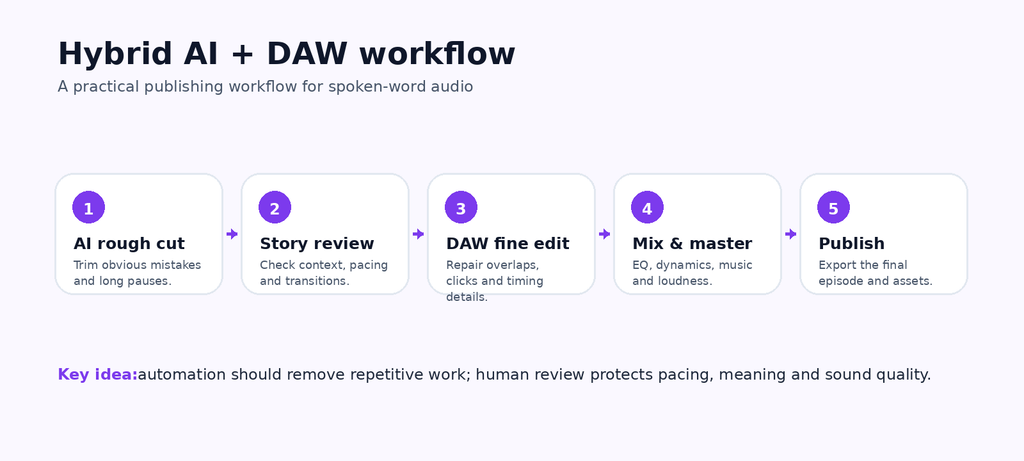
Figure 2. A hybrid workflow keeps AI automation where it is strongest and reserves the DAW for precise finishing.
How to Test AI Editing vs a DAW on the Same Podcast
If you want this article to become genuinely link-worthy research, run both workflows on the same raw episode. Do not invent the numbers. Record them.
| Metric | AI workflow | DAW workflow |
| Setup time | Measure | Measure |
| Total editing time | Measure | Measure |
| Hands-on editing time | Measure | Measure |
| Filler words detected | Measure | Measure |
| Wrong/awkward cuts | Measure | Measure |
| Overlaps needing repair | Measure | Measure |
| Noise cleanup quality | Measure | Measure |
| Music/mix control | Measure | Measure |
| Final manual corrections | Measure | Measure |
| Export and publishing time | Measure | Measure |
For a useful test episode, include at least two speakers, ordinary background noise, a few filler words, long pauses, one or two overlaps, an intro/outro music bed and noticeable volume differences. Publish the methodology and explain any corrections you made. That transforms the article from a generic comparison into original editorial research.
Which Should You Choose?
Choose by the shape of your production, not by whether a tool has “AI” in the name.
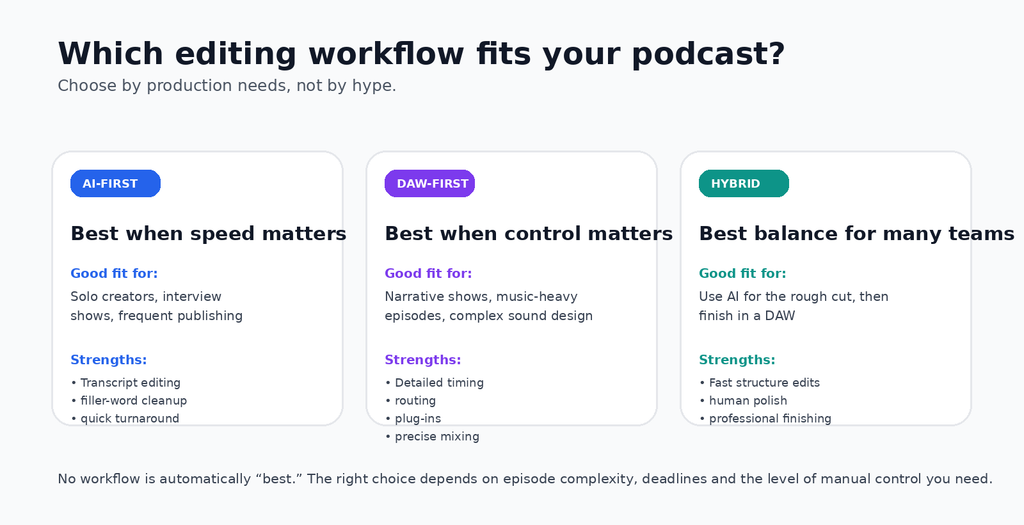
Figure 3. A practical decision guide for AI-first, DAW-first and hybrid podcast workflows.
AI-First Workflow Is a Good Fit When…
- You publish interviews or conversational episodes frequently.
- You are a solo creator and editing time is the main bottleneck.
- You want transcript-based navigation and fast rough cuts.
- Your sound design is simple and your recordings are already reasonably clean.
DAW-First Workflow Is a Good Fit When…
- Your show uses layered music, ambience or sound effects.
- You regularly repair overlaps, clicks or difficult recordings.
- You need detailed routing, plug-ins and automation.
- The sonic style of the show is part of the creative product.
Hybrid Workflow Is a Good Fit When…
- You want transcript speed without giving up final audio control.
- A producer or co-host makes the rough cut and an editor handles finishing.
- You have long episodes where structural editing takes more time than mixing.
- You want to automate repetitive tasks but keep a human in charge of pacing and sound.
Common Tools in Each Category
AI/transcript-first tools: Descript, Adobe Podcast and other editors that combine transcription with automated cleanup and content editing.
DAWs and waveform-first editors: REAPER, Logic Pro, Adobe Audition, Audacity and similar tools built around multitrack timelines, clips and audio processing.
Automated post-production: Auphonic is an example of a service focused on leveling, loudness normalization, filtering and noise reduction rather than being a full replacement for an editing DAW.
SEO and E-E-A-T: What Makes This Comparison Stronger for Search?
For search, the strongest version of this article is not the longest one. It is the one that proves it has done useful work. Google’s guidance asks whether content contains original information or analysis, demonstrates first-hand expertise, provides substantial value and leaves the reader feeling that they learned enough to achieve their goal.
That means your publishing version should show exactly how the test was run, include screenshots from your own project, explain the limits of the test, link product claims to official documentation and label community opinions as opinions. Add an author bio that explains the editor’s real podcast or audio-production experience if that experience exists.
Avoid keyword stuffing. Use the primary keyphrase naturally in the title, introduction and one relevant heading, then write semantically around the topic with terms such as transcript-based editing, waveform editing, multitrack podcast editing, filler-word removal, audio cleanup, post-production, EQ, compression and mastering.
Source: Google Search Central — helpful, reliable, people-first content
Frequently Asked Questions
Are AI podcast editors better than traditional DAWs?
Not universally. AI editors are often faster for transcript-driven rough cuts and repetitive speech cleanup. Traditional DAWs provide deeper control for repair, mixing and sound design. The better choice depends on the complexity of the show.
Can AI completely edit a podcast?
It can automate a large part of a straightforward spoken-word workflow, but a human review is still important. Context, pacing, overlapping dialogue and sonic taste are difficult to reduce to one automatic rule.
Is transcript-based editing the same as waveform editing?
No. Transcript-based editing treats speech as text linked to media. Waveform editing works directly with audio clips and timing. Many creators use both.
Can I use an AI editor and a DAW together?
Yes. A common hybrid approach is to make the structural rough cut in a transcript editor, then finish the project in a DAW for detailed timing, music, EQ, dynamics and mastering.
Does removing all filler words make a podcast better?
Not necessarily. Some fillers are distracting, but others preserve natural rhythm or thinking time. Review bulk removals instead of assuming every hesitation should disappear.
Which workflow is best for beginners?
A transcript-based editor can reduce the initial learning curve for speech editing. Learning a DAW is still valuable if you want advanced audio control or expect your production style to become more complex.